Update (2026-09-08): I’ve since given this thing a proper name and domain name: Battenburg. The links in the post have been updated to point to the new domain name, though the original text remains unaltered.
Sometimes you’re working on a project with a lot of colours.
Maybe those colours are new to you because a recent rebrand has changed the foundations of your design system, or maybe you’re just working on a redesign of a personal project.
In an ideal world (and we all want an ideal world, right?) the colour combinations you end up using should be accessible. You might even be legally required to make them accessible, usually against a specification like the Web Content Accessibility Guidelines (WCAG), which sets out minimum contrast ratios for user interface elements, text, and state changes.
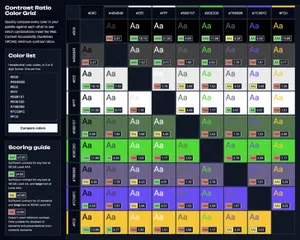
When you need a button to have a 3:1 minimum contrast ratio against the background of the page, and a further 4.5:1 minimum contrast ratio between the button’s background and the text, comparing colour pairings one at a time with conventional contrast tools is a faff. Why not do all of them at once?
So yeah, I built that.
Why I made this thing
The Contrast Ratio Color Grid tool (I never said I was good at names) is a side project that I started working on in 2024, when I first got involved in the GOV.UK brand refresh project.
That first version can still be found on my GitHub.
This was only ever intended to be a one-time reference, so it was built with Eleventy for rapid prototyping and had all of the colours hardcoded in data files.
Having it available as a general use tool, however, seemed like a really good idea, so I started writing one in Express back in February of this year. It’d been a lil while since I last used Express, but getting back into it was super easy. Man I love the JavaScript ecosystem (MILJSE).
Then I let it sit for a while, and then I gave it a bit of a redesign and some functional tweaks over the last week and now I’m calling it done. Or done in minimum viable product terms, anyway.
So uh, check it out I guess. Here’s an example with a buttload of colours to serve as a demonstration of how useful it can be.
Contrast Ratio Color GridPresumably assumed questions (PAQs)
Hey, your original tool did APCA! Why doesn’t this one?
APCA (or the Accessible Perceptual Contrast Algorithm to its frenemies) is undoubtedly a better contrast algorithm than the WCAG algorithm.
It’s also not part of any WCAG specification, and thus not the algorithm that is mandated by a bunch of accessibility legislation.
The way it calculates scores is also more complicated, taking into account aspects like the size and metrics of the font being used, which makes it much more difficult to generalise into a one-size-fits-all tool like this.
I might add APCA support at some point, but not right now.
What’s the deal with the long-ass hash strings in the URLs?
The hash strings contain all of the colours, but encoded into base64. I figured doing it that way would be more space efficient than listing out all the actual colour hex codes. I might’ve been wrong. Oops.
(I have a vague intention to put more metadata in the hash at some point, at which point doing it that way might make more sense, but at the moment there isn’t.)
Can I pass hex codes in the URL instead?
Yes, you can! Instead of the ?hash= bit, use ?colors= followed by a comma separated list of hex codes with the # removed. That works just as well.
There’s no privacy statements or cookie banners or anything. What gives?
The tool has the same privacy practices as this here website. There’s no cookies, no analytics, nothing is ever recorded except for the URLs requested, and those get deleted after a week.
*some vague ramble about security*
It’s true that I’m not a seasoned securitycritter, and this is like, a website that actually accepts user input and renders stuff on a page using it. Not some static site bullshit like this blog.
If you find a security issue with it, let me know.
Is this open source?
Of course it is, you silly goose. It’s permissively licensed too. Do whatever the hell you want with it.
*Extremely British voice* Why ‘color’ without the ‘u’?
HTML and CSS use American spellings. If you don’t like it, blame Tim Berners-Lee.